
isolved People Cloud
InfinisourceBusiness
3.4786.00 Reviews
- Version
- 66.20260915.1
- Installs
- 500.00K
- Age Rating
- Everyone
Screenshots
Our Review of isolved People Cloud
 Analysis by Appyee
Managing work responsibilities from a phone sounds simple until everyday tasks start competing with one another. Before using isolved People Cloud, I often found that HR-related work was scattered between email threads, desktop sessions, reminders, and messages from colleagues. This app takes a more focused approach: it puts essential employee and workplace actions into a mobile HR environment that I can reach when I am away from my desk.
Developed by Infinisource, isolved People Cloud is a free business app for Android devices running Android 6.0 or later. It is suitable for everyone from an age-rating perspective, and its practical audience is employees, managers, and organizations already working with the isolved platform. The app has passed half a million installs and holds a 4.3 average from roughly 1.8 thousand ratings, which suggests that it has found a useful place in many everyday workplace routines.
From scattered HR tasks to one mobile routine
I find the value of a mobile HR app clearest when it turns a scattered obligation into a single, repeatable step. This section looks at how isolved People Cloud fits into that shift without pretending that a phone replaces the organization’s wider HR system. From there, the focus moves to what that routine feels like in ordinary use.
What work looks like before opening the app
The most important thing to understand is that this is not a general task manager pretending to be an HR tool. It is designed around access to workplace functions that are normally tied to an employer’s HR system. That distinction matters. If I only need a personal to-do list, a calendar, or a note-taking app, isolved People Cloud is more specialized than necessary. Its value appears when I need to check or handle work-related information without waiting until I can sit at a computer.
That can make a noticeable difference in a normal day. Imagine leaving home and realizing that you need to check a workplace detail before arriving, or taking a break and wanting to complete a routine HR action while the information is fresh in your mind. Instead of writing a reminder and hoping to remember later, I can begin with the mobile app and keep the action inside the same work system. The benefit is less about doing more and more about reducing the number of places where a small responsibility can disappear.
There is also a useful boundary here. The app does not replace an organization’s HR setup, and it cannot be treated as a standalone employee-management system. Access depends on the workplace environment behind it. If an employer does not use the relevant isolved services or has not enabled the necessary access, installing the app alone will not create a complete HR workflow. That is an important consideration before expecting it to work like an independent employee portal.
Starting with the right expectations
My first recommendation is to treat the app as a doorway into an existing work process, not as a blank workspace that I can customize from scratch. The best experience comes when I already know what kind of workplace tasks I want to handle from my phone. That might be checking information, responding to an HR-related action, or keeping up with an employer’s routine while working away from a desk.
This mindset prevents a common mistake: opening the app without a clear purpose and assuming that a mobile version should contain every function found in a full desktop environment. A phone is useful for quick access and timely actions, but it is not always the best place for extended administrative work. I prefer using it for short, meaningful check-ins and switching to a larger screen when a task requires careful review, detailed entry, or broader context.
The current version is 52.20250212.3, and the app’s release date was October 3, 2023. Those details are useful when checking compatibility or discussing support with an employer, especially if a workplace has a managed-device policy. I would also make sure the device meets the minimum Android requirement before troubleshooting an installation that may simply be incompatible.
Capturing information without creating another inbox
A sustainable productivity system needs a clear rule for where work information belongs. With isolved People Cloud, that rule is straightforward: if the matter belongs to the employer’s HR process, I try to keep the action in the app rather than copying it into personal notes or sending myself a reminder. That reduces duplication and makes it easier to return to the original workplace context.
This is one of the app’s more practical strengths. A separate notes app may be faster for writing down a thought, but it can leave me with an unverified reminder and no direct connection to the underlying HR record. The mobile HR app is more valuable when I use it to complete or review the actual work item instead of merely recording that I should deal with it later.
There is a trade-off. A specialized HR app is not as flexible as a general productivity tool. I cannot expect it to organize unrelated projects, personal errands, or team brainstorming. I see that limitation as healthy when used deliberately: workplace information stays in the workplace system, while personal planning remains in the tool built for it. Mixing both areas may feel convenient at first but can make important HR actions harder to find.
Building a repeatable check-in
The app becomes more useful when it is attached to a repeatable moment rather than opened randomly. I would choose a small number of natural points in the day, such as the beginning of a shift, the start of a work break, or the end of a workday. The goal is not to spend a long time browsing. It is to create a reliable check-in that prevents small HR responsibilities from accumulating.
A good routine starts with a quick scan of what needs attention, followed by one deliberate action. If something requires more concentration, I note the next step in my normal work-planning system and move on instead of repeatedly reopening the app. This keeps the mobile workflow lightweight. It also prevents a common productivity problem: turning a tool intended to save time into another stream of notifications and checking behavior.
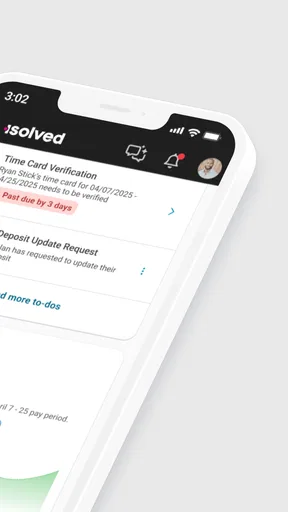
For managers, the routine can be slightly different. A manager may use the app as a mobile checkpoint before a conversation, after a schedule change, or while away from a workstation. The useful habit is to verify information at the moment it matters, not to rely on memory or informal messages. However, I would still avoid making important decisions from a rushed phone glance when a larger review is more appropriate.
Employees can benefit from the same principle in a simpler form. Instead of waiting for a weekly desktop session, I can deal with small workplace actions when they fit naturally into the day. That is especially helpful for people who move between locations or do not spend their entire shift at a desk. The app’s purpose becomes clearer when it supports continuity rather than trying to become the center of every work activity.
Where the workflow can fail
The first failure point is access. Because this is connected to an employer’s HR environment, a login problem may not be something I can solve by reinstalling the app. Workplace credentials, account setup, and organizational configuration can all affect the experience. I would confirm that my employer expects mobile access before spending time changing device settings.
The second failure point is assuming that mobile access automatically means full desktop parity. A phone interface is convenient, but long forms, detailed records, or tasks involving several pieces of information may be slower and more tiring on a small screen. When accuracy matters more than speed, I would use a desktop browser or the organization’s normal larger-screen workflow if that is available.
The third is notification fatigue. Any work app can become counterproductive if I respond to every alert immediately, especially outside working hours. I prefer defining when the app belongs in my day and when it does not. That boundary is not a missing feature; it is part of using an HR tool responsibly. Mobile availability should reduce friction, not quietly extend the workday.
A fourth issue is misplaced trust in a quick glance. HR information can influence decisions, conversations, and planning. I would check the relevant details carefully and avoid relying on a remembered screen or an informal note. The app makes access easier, but it does not remove the need for judgment. Convenience is most useful when paired with a deliberate review habit.
How it compares with ordinary alternatives
Compared with email, isolved People Cloud offers a more appropriate home for HR-related work. Email is excellent for communication, but it is a poor long-term filing system for routine employee actions. Messages can be buried, forwarded, or separated from the information they refer to. A dedicated mobile HR app keeps the user closer to the organization’s intended process.
Compared with a general notes app, it is less flexible but more relevant. Notes are useful for capturing a thought, yet they do not replace access to workplace records or an employer-managed workflow. I would use notes only for a temporary personal reminder, then return to the HR system to complete the real action.
Compared with a desktop HR portal, the app wins on immediacy and portability. The desktop usually remains better for extended sessions, careful comparison, and tasks that benefit from a wide layout. I do not see these as competing choices. The most sustainable setup uses the phone for timely access and the larger screen for work that deserves more attention.
Compared with a broad employee productivity suite, isolved People Cloud is narrower. That narrowness is useful if the organization already relies on isolved and wants employees to reach essential HR functions from different devices. It is less compelling for someone looking for project management, team chat, document collaboration, or personal planning in one application.
Who should adopt it, and who should skip it
I would recommend isolved People Cloud to employees who already belong to an organization using the isolved ecosystem and who regularly need mobile access to workplace HR tasks. It also makes sense for managers who move between offices, work areas, or locations and do not want every small HR check to wait for a desktop session.
It is particularly suitable for people who struggle with fragmented routines. If my current method is a mixture of email searches, handwritten reminders, and occasional desktop visits, a dedicated mobile entry point can make the process easier to remember and easier to repeat. The improvement comes from reducing handoffs, not from adding a long list of unrelated capabilities.
I would skip it if I am looking for a standalone HR solution for a small personal business, a general employee directory, or an all-purpose productivity app. I would also hesitate if my work rarely involves HR actions away from a computer. In that case, the extra installation and account dependency may not provide enough value.
Organizations should think about adoption as a workflow decision rather than simply telling staff to install an app. Employees need to know when mobile access is appropriate, which tasks should remain on a desktop, and whom to contact when account access fails. Without that guidance, the app may be blamed for problems that actually come from unclear internal processes.
Practical habits that make mobile HR access worthwhile
I would begin by placing the app where it is easy to reach but not so prominent that it invites constant checking. Then I would use it during one established work moment for a week, paying attention to which actions genuinely benefit from mobile access. This small trial reveals whether the app is solving a real delay or merely duplicating an existing routine.
Next, I would separate quick actions from review-heavy work. Quick actions belong in the mobile check-in. Anything involving careful reading, comparison, or a decision with wider consequences should move to a larger-screen session. This simple division is one of the most useful ways to avoid both rushed mistakes and unnecessary phone time.
I would also keep a clear escalation path. If an account issue, missing workplace information, or unexpected behavior blocks progress, I would contact the employer’s HR or technical support channel rather than repeatedly guessing. Since the app is part of an organizational system, the fastest solution may be administrative rather than technical.
Finally, I would review the routine after a few weeks. If the app has replaced scattered reminders with a dependable check-in, it is earning its place. If I am opening it without completing anything useful, I would reduce the frequency or return to the desktop workflow. Sustainable productivity is not about using an app more often; it is about using the right tool at the right moment.
My final assessment
isolved People Cloud is a focused business app that makes the most sense as one mobile layer of an existing HR system. I like it because its role is clear: it helps bring essential workplace access closer to the moments when employees and managers actually need it. The free price and broad device reach make trying it straightforward, while the established install base and 4.3 average suggest that it is already familiar to many users.
My recommendation comes with a condition: approach it as a companion to an organized work routine, not as a replacement for every HR or productivity tool. It is strongest when I use it for timely checks, keep workplace actions in their proper system, and reserve detailed work for a larger screen. It is weakest when I expect it to function independently of an employer’s setup or to replace general planning tools.
For the right user, that distinction is enough to make it worthwhile. If your organization uses isolved and you want a dependable way to stay connected to HR tasks while away from a desk, I think this app deserves a place in your routine. If you need a complete business workspace rather than mobile HR access, a broader alternative will serve you better.
Privacy and Permissions
See what permissions an app requests and how it handles your data.
- Location
- approximate location (network-based), precise location (GPS and network-based)
Verdict
Strengths of isolved People Cloud
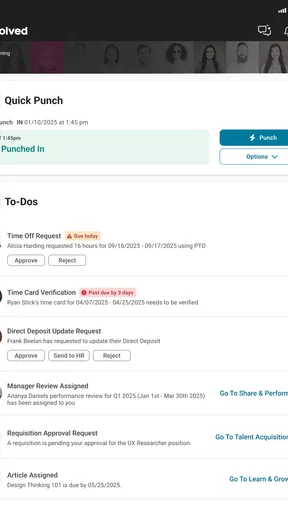
- Centralizes employee records, schedules, and HR tasks in one place.
- Mobile access helps employees manage information while working remotely.
- Self-service tools can reduce routine questions for HR teams.
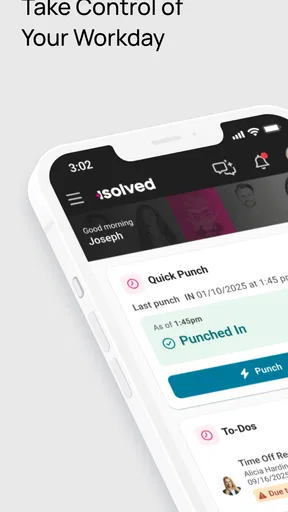
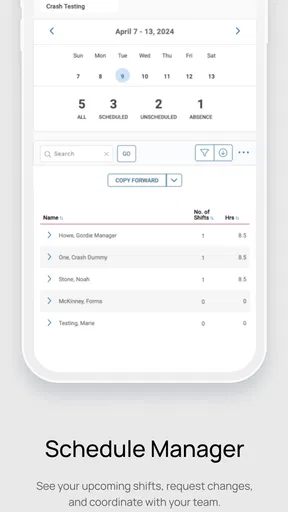
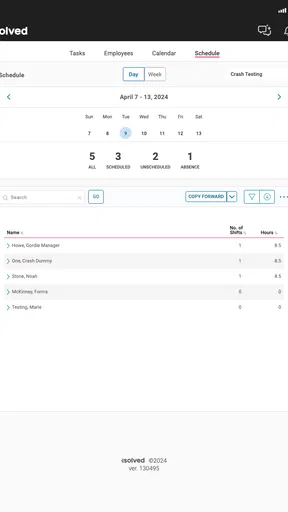
- Supports time tracking and attendance workflows for eligible organizations.
- Useful notifications keep employees informed about HR-related actions.
Limitations of isolved People Cloud
- Available features can vary significantly by employer configuration.
- The interface may feel complex for occasional users.
- Some actions require reliable internet access to work properly.
- Payroll and time data may take time to appear after updates.
- Employees cannot control missing features enabled by their organization.
Similar Picks in This Category
View All
LinkedIn: Community & Network
LinkedIn3.8

Zoom Workplace
zoom.com4.1

Microsoft Teams
Microsoft Corporation4.6

Meta Business Suite
Meta Platforms, Inc.4.6

Webex Meetings
Cisco Systems, Inc.4.5

TeamViewer Remote Control
TeamViewer4.4
Frequently Asked Questions
What is isolved People Cloud, and what can I use it for?
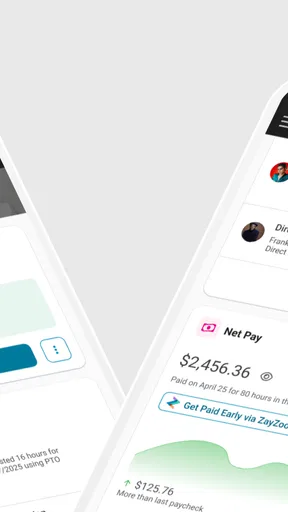
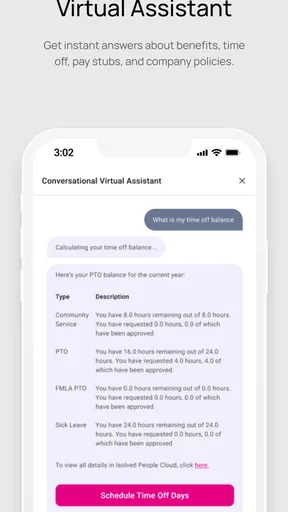
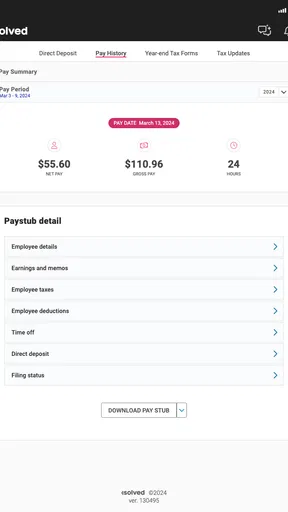
isolved People Cloud is a cloud-based human resources and workforce management platform designed for employees, managers, and HR teams. Depending on the features enabled by your employer, you may use it to view pay information, check schedules, request time off, record working hours, access benefits details, complete onboarding tasks, review company documents, and update certain personal information. Available tools can vary between organizations.
How do I log in to the isolved People Cloud app?
To use isolved People Cloud, you generally need an account provided or activated by your employer. Your organization may require a specific company code, portal address, username, password, or single sign-on method. Some employers also require multifactor authentication for added security. If you cannot sign in, your HR or payroll administrator is usually the correct contact, since app support may not be able to verify your employment account.
Can I view my paycheck, tax documents, and benefits in isolved People Cloud?
In many organizations, isolved People Cloud provides access to payroll-related information such as pay statements, year-to-date earnings, tax withholding details, and downloadable tax forms. Benefits enrollment or coverage information may also be available if your employer uses the relevant isolved modules. However, the exact documents and features depend on your company’s subscription, configuration, and payroll policies, so not every user will see the same options.
Can I use isolved People Cloud to request time off or track my work hours?
The app may allow you to clock in and out, submit timesheets, review attendance records, check schedules, and send vacation or other leave requests to a manager. These functions are only available when enabled by your employer and may follow organization-specific approval rules. Before relying on the app for payroll-critical actions, confirm that your workplace accepts mobile time entries and learn how corrections or missed punches should be reported.
Is isolved People Cloud safe to use, and does it cost employees anything?
isolved People Cloud is intended for secure access to sensitive employment, payroll, and personal information, so users should protect their login credentials, use multifactor authentication when offered, and avoid signing in on shared devices. The app itself is typically provided as part of an employer’s HR service, meaning employees generally do not pay a separate subscription fee. Your organization controls access, available features, and account permissions.
